or, how to program with Google 😉
There’s a couple of things that have bugged me on the weblog; I decided to try and fix them by modifying the WordPress code but as is traditional, I don’t want to bother learning more than I have to (I do enough of that at work – the latest Microcontroller we’re using has about 1500 pages of documentation!)
So, annoyance #1: In WordPress when you click on the comments link from the main page, you go to the top of the list of comments, then you have to scroll down to the bottom where you can add a new comment … I wanted to have a link at the top saying “post new comment” that would send you to the bottom. Well I managed that by modifying the comment php, finding a place to add an sequence, and placing a link to it.
But it still didn’t seem quite right – I wanted to go to the comment post area and put the cursor into the text box! Of course I had no idea if it was possible, but I felt that it should be … so guessing it would be like Visual Basic (which I do use), I searched Google, and found this link – nice 🙂
So I added javascript:document.forms[0].comment.focus() to the WordPress comments code, and magically, it worked! I love it when a plan comes together like that 😉
OK, annoyance #2. Whenever I add a picture to my weblog entries, I always add the “width=” and “height=” to the ![]() stuff; this is because when I see webpages load with lots of pictures that don’t have width/height specified, the page display constantly jumps around as new images get loaded in and shove the later text/pictures down … you see it especially when visiting the MINI2 or NAM forums in threads with lots of pictures and you try to go to the last post.
stuff; this is because when I see webpages load with lots of pictures that don’t have width/height specified, the page display constantly jumps around as new images get loaded in and shove the later text/pictures down … you see it especially when visiting the MINI2 or NAM forums in threads with lots of pictures and you try to go to the last post.
So I’ve always added the image size details, so even before the browser loads the image, it knows what space to reserve for it. But I do this manually, by right-clicking reading “properties”, noting the values, then typing the width=”…” height=”…” into the weblog entry page.
So today I decided to try and automate it. I Google’d to a webpage that told me about getimagesize which sounded useful … but then I tried searching through all the WordPress code to see where the “img” button is set up (for the non-rich editor) …
Problem! Finally learned that the code is in quicktags.js which is Java, not php.
So off we go again into Google world, looking for a Java way to get image width/height … this took longer than expected but finally I found this page which talked about getting the information from a file (file://). But maybe it’ll work for a http:// link too?
So I edited the quicktags.js file and threw in a few extra lines of code:
function edInsertImage(myField) {
var myValue = prompt(‘Enter the URL of the image’, ‘http://’);
var img = new Image();
if (myValue) {
img.src = myValue;
myValue = ‘<img src="'
+ myValue
+ ‘” alt=”‘ + prompt(‘Enter a description of the image’, ”)
+ ‘” width=”‘ + img.width + ‘” height=”‘ +img.height
+ ‘” />’;
edInsertContent(myField, myValue);
}
}
Then I tested it – and it worked, immediately! Just like that 😀
Now to annoyance #3. I haven’t solved this one yet – so if anyone wants to comment on “the story so far”, feel free.
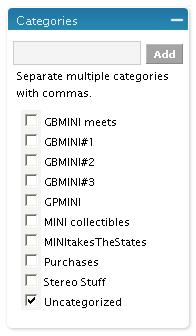
When I write a new post in WordPress, it lists categories to the side – but I now have 9, and the list is too big for the box so there’s a vertical scroll bar 😦
I want all the categories to be listed, with no scroll bar, stretching the box as much as necessary. I’ve got a large monitor and I’d like to use it.
So again, I’ve searched around the WordPress files, and got as far as determining the list is something to do with
– if I remove that (and the matching
), the categories are all listed with no scroll bar.
But I think the categorychecklist might be important – for one thing, there seems to be (more) Java code which can add a new category “on the fly” while posting, and modifies the categorychecklist … I think I can happily not use that feature, but I’m not sure if there’s a better way.
I haven’t yet found where the categorychecklist is defined, and told to be only a certain height … but then, it’s probably CSS and I’m still trying not to learn about them!
There’s still more stuff to be done …
Why for example is the sidebar text a different size in the Gallery to what it is in the weblog? Oh, it isn’t today – apparently my recent mods have just about fixed it.
All this is CSS stuff, a big pain! It’s all nested one inside another, and later definitions can override earlier ones – hard to plow through to figure what’s really specifying what! What’s needed is an editor that can identify what CSS is applied to a particular bit of text, and how it got to be defined. Anyone?
Meanwhile, I console myself that the layout is OK 😉
UPDATE:
Jason fixed my Categories annoyance – hooray 🙂