I guess it’s time for an Android update (see original rant); short answer – I still have an Android phone, my iPhone is sold and gone to a (hopefully) happy new owner! Long answer follows, if you’re interested …
On the downside, my Android phone continues to have poor battery life, worse than my iPhone 3GS and much worse than Josh’ iPhone 4 – but it is now useable for a full day, so I’ll just learn to charge it every day. Other than that, this phone sucks at taking pictures in dim light – it “green balances” when using it’s built-in flash! And finally, the choice of useful Apps for Android remains poor in comparison to iPhone …
On the upside, it’s VERY nice to customize the Android lock screen, and to have useable and useful access to notifications. This is my lock screen, customized with WidgetLocker:
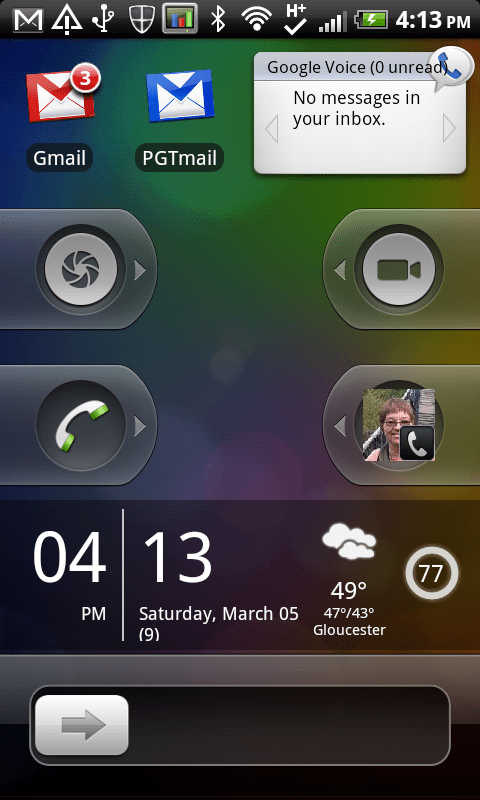
I chose the iPhone-like unlock slider, giving lots of space to add stuff – at the top I have live counters for home and work unread email, as well as any Google Voice notifications (of course, AT&T non-visual voicemail is rubbish, so it’s necessary to use Google Voice!).
At the bottom above the unlock slider is the SiMi Clock widget, showing date and time, current weather, and battery charge.
In between are four “slide-to-action” devices that give quick access to phone features without needing to go to the main home screen and open an App – my four do “Camera”, “Camcorder”, “Phone”, and “Call Margaret”.
Really nice, and iPhone has nothing so good (maybe if you jailbreak? But not built in).
Note also all those notification icons across the top of the screen – new mail, USB active, Bluetooth, WiFi, etc. Once the phone is unlocked, you can touch/slide down that bar, to access descriptive linkable information for every notification, like this:

So there’s a new email notification – touch it to go to the message; there’s also USB notifications (touch to change how the phone is connected to the computer). The strange “USB debugging” is because stupidly that is currently the only way to capture screenshots on Android – yes, iPhone still wins for some things!
At the top is a left/right slideable list of recently accessed Apps. Easier to get to than double-tapping the home screen!
If you do go to the home screen, you’ll find it (on HTC at least) with nice animated time/weather, as well as icons for Apps and/or folders (like an iPhone):
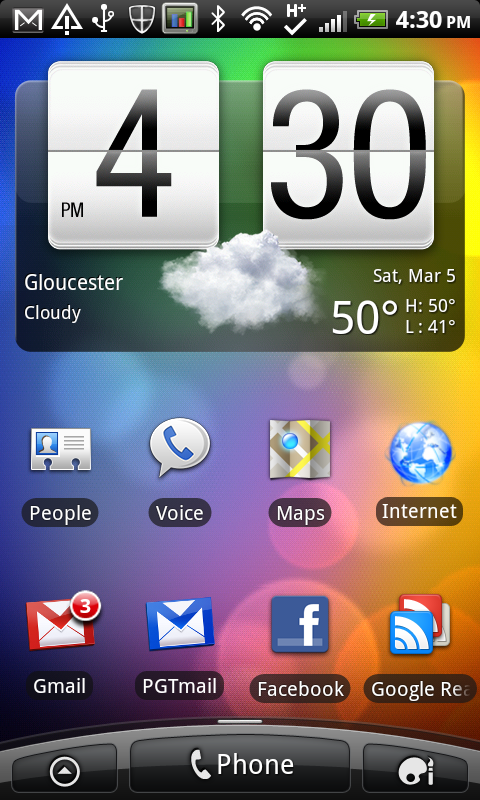
I had to purchase Folder Organizer to really make folders work well on Android – but now I can (better than iPhone) have folders within folders! So for example all my Apps are organized in one Apps folder, with sub-folders for different categories – and taking only a single icon position on the home screen …


There’s lots of “geeky” things about Android too – pattern-based unlock, System Panel to track phone activity, 3G tracking to monitor data usage, and of course Juice Defender configurable to extend battery life (yes, not needed on iPhone!) …


Sadly I’ve not found anything like Photogene to edit photos, and the built-in photo handling cannot for example resize a photo when emailing it! Similarly there’s nothing to edit videos. But to great benefit, Google influence means that Gmail, Google Voice, Google Reader, all work very well on Android – you can even configure Google Voice to automatically take over any international calls that you dial!
I’d wish for a longer battery life, and for Photogene, but other than that, this phone with huge display, useful lock screen, and can’t-lose-them notifications, is an improvement over todays iPhone. But if Apple could finally do something smart with notifications (and a dashboard-like lock screen configurator) on iOS 5, they would be easily ahead of Android again. Competition is good!

 M&I / GBMINI