GBMINI#5 came with the iPod interface installed – good news because I’m not sure I’d have liked to pay $500+ for it!
In GBMINI#5, the iPod cable is installed into the “secret” storage space above the glovebox – you push the dash trim piece (firmly, in the center!) to open it, and inside is an iPod connection cable; like most iPod interfaces, the iPod goes “dead” when connected, just displaying a graphic and “OK to disconnect” screen (the storage area is rubber lined, and the cable helps to hold the iPod, so it doesn’t rattle around – good):
When you’re planning music, the NAV screen has a quite nice display showing the current track, along with “before & after”; there’s a submenu option to toggle “Details” on and off, which gives you the artist as well as the song title, for the current track, but that’s pretty well where the nice iPod interface ends! For example, here’s what you might think is a nice menu of artists on the iPod:
What’s so bad about that?
Well: notice first that we have “CD2” selected, and above we had “CD1” selected. The iPod interface is implemented by mimicking a CD changer; CD1 gives a menu of music in Playlist order, CD2 is Artists, CD3 is Albums, CD4 is Genres, CD5 is Podcasts and CD6 is All Songs.
So to get to the Artists list, I had to switch from CD1 to CD2; to do this you simply push the joystick up, a couple of times, then rotate, then click. But then comes the really “exciting” part … I had to wait EIGHTY SECONDS for the Artists menu to appear!
When it’s finally ready, it automatically starts to play the first song by the first artist – of course that’s probably not what you want, so
simply push up, click, rotate left, and click. Now finally you have a list of Artists, with the first alphabetic artist shown.
OK, so we want to listen to a different artist. How about Supertramp?
There’s no way to quickly jump to a specific letter of the alphabet, or even to move by more than one menu entry – the only choice is to rotate the joystick to go down through the Artists; this of course takes FOREVER (worse still because the display update is slower than the rotation speed!)
Luckily, it doesn’t take quite as long as you’d expect – cleverly, the iPod interface is limited to 255 menu entries! So we actually can’t get to Supertramp anyway; in fact the screen above with Lucero as the last item, is the end of the menus.
Alright then, how do we get to Supertramp?
Well, I could build lots of Playlists to set up different ways to access my music – maybe a Playlist for “A”, “B”, etc … but I saw someone post online that method doesn’t work because the menu gets overloaded and still runs out!
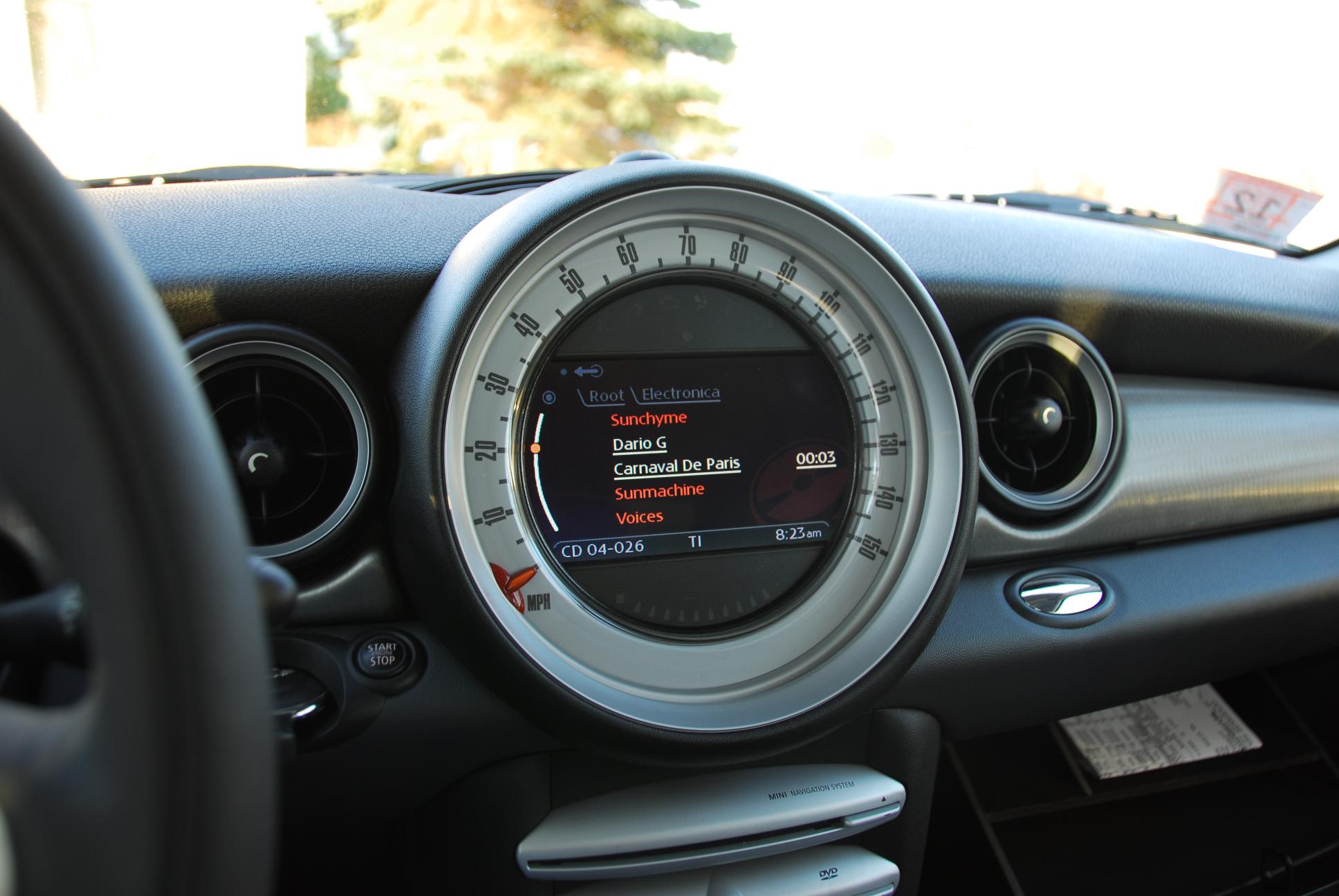
Plus, the menu is only one level deep – for example, here I accessed via CD4 / Genres and called up “Electronica”:
As you can see, what appears is just a list of songs. There’s no sub-menu of Artists or Albums first … it looks like the song list here is in Artist order (it’s displaying tracks by AudioBody), so I guess with enough knowledge of what’s in your iPod you might be able to scroll down the list to get to the song you want. Although I suspect the list of songs might still stop at 255 entries!
In the end, I’ve decided to use Random play which hopefully will give me a random choice from all the songs in the iPod:
Of course you have to be careful what you have selected – counter-intuitively, “Random All” apparently randomly selects from a subset of all music in the iPod, depending what you have selected; it acts more like you’d expect “Random Directory” to work …
Infuriatingly though, when it’s playing in Random mode, the skip previous/next buttons don’t skip to a different random track!
Suppose you have Random play active and it selects an Artist you don’t fancy listening to today. In GPMINI with the Alpine HU I click -> (next track) and get some new random song. But in GBMINI#5, if I click -> I get the next song from the same Artist/Album; exactly what I don’t want!
The only choice is to click the joystick to turn off Random play, then click again and turn it on again.
I really wish the iPod interface was better. It should be much faster (my Alpine/iPod interface is instantaneous when I select by Artist/Album/etc), and there should be no problem with having music collections of more than 255 Artists/Albums.
As it is, I don’t expect MINI to do anything different, and it will be hard for an aftermarket company to develop something – the MINI is becoming more and more proprietary and difficult to change.
I wonder if the non-NAV iPod interface is any better. Maybe it’s slow on the NAV because it has to display more on the bigger screen? I hope one day to try my iPod in a non-NAV R56.
As it stands, I probably would still have to spec this iPod interface in a future R56, since the only other choice is connecting via the AUX plug and using the iPod controls (and honestly, trying to wave your finger around the iPod controls while driving is much worse than using the R56 NAV joystick!)
But much better is out there; why can’t we have it?
(anyone seen that Ford / Microsoft car advert where the driver presses a button an SPEAKS the Artist name to get it to play? sounds wonderful!)
Oh, nearly forgot – one more ludicrous limitation of the R56 iPod interface!
It doesn’t remember where you are in the current playing track, when you turn the car off – well, if you switch off for a short time it does remember, but after a few minutes it will revert back to the beginning of the track when you come back to the car! That’s really annoying when you’re listening to a long track, and never get to the end of it.


 M&I / GBMINI